Why Sora?
Your Library on the GoSora is there when the library is closed. Use it when you're social distancing, when you're on vacation, or when you just want to get a new book without leaving the comfort of home.
|
|
|
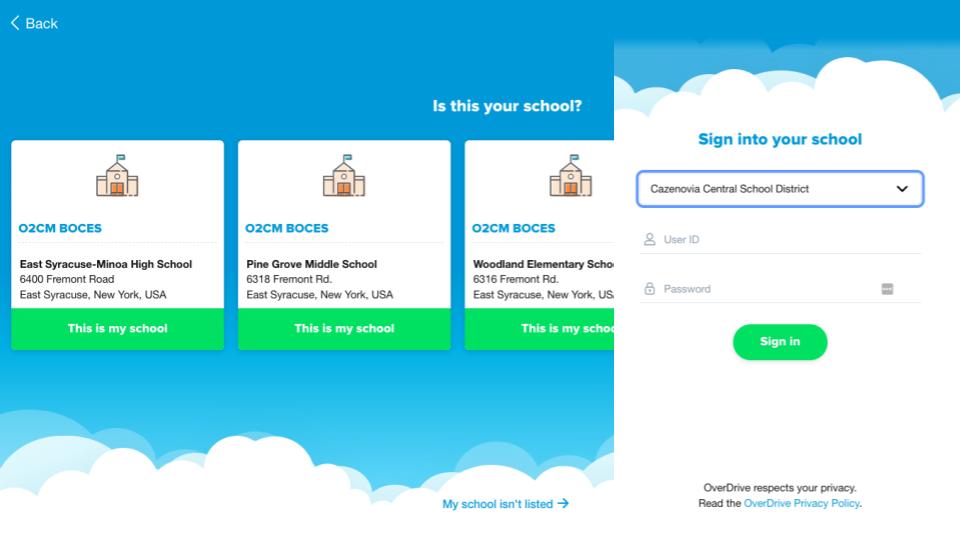
Easy SetupAs a Cazenovia student or staff member, you already have a Sora account. Just set your school to O2CM BOCES, and sign-in with your school username (without the @caz.cnyric.org) and password*.
*Staff members have a generic password. Email Mr. Wightman for details.
|
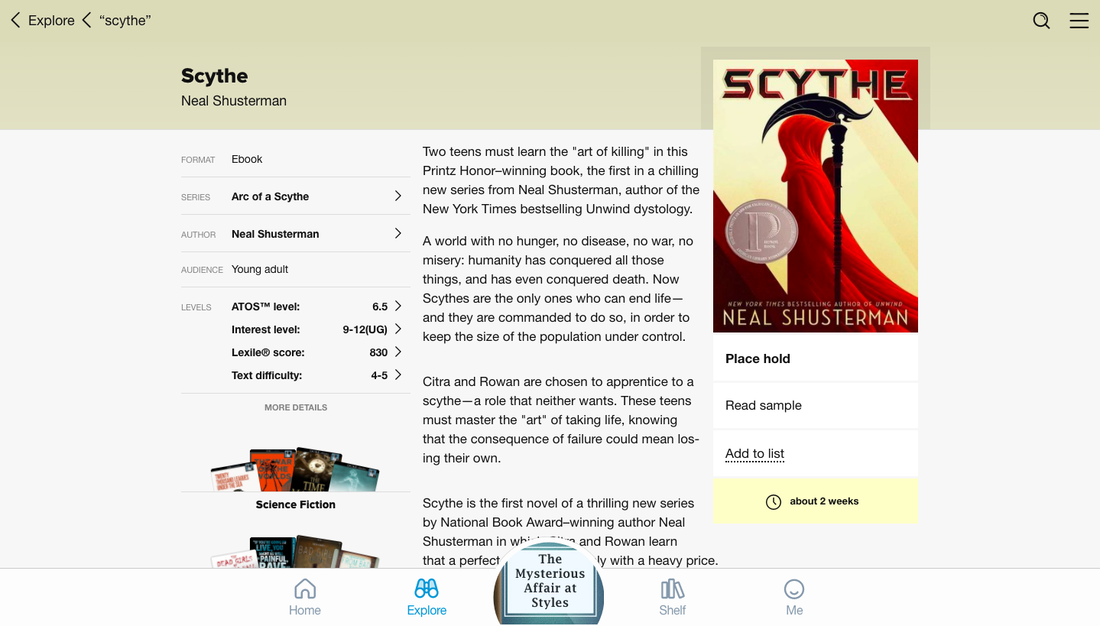
Search and BrowseFind a specific book, or discover something new from the collection. It's all laid-out on Sora's Explore page.
|

|
|
Preview and ReserveTap a cover to preview a book. Download sample chapters if you want to see more. Place a hold if someone else is already reading. Sora is like the regular library: only one person can use a copy at a time.
|
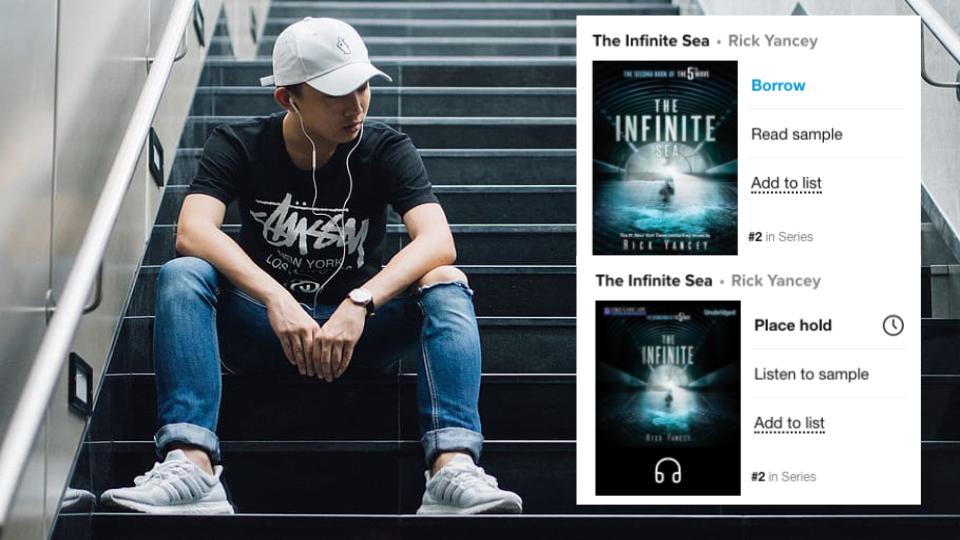
Read and ListenSora has ebooks and audiobooks. Look for the headphone icon to find audiobooks. Listening to a Sora audiobook is a great way to pass time while exercising or going on a trip.
|
|
|
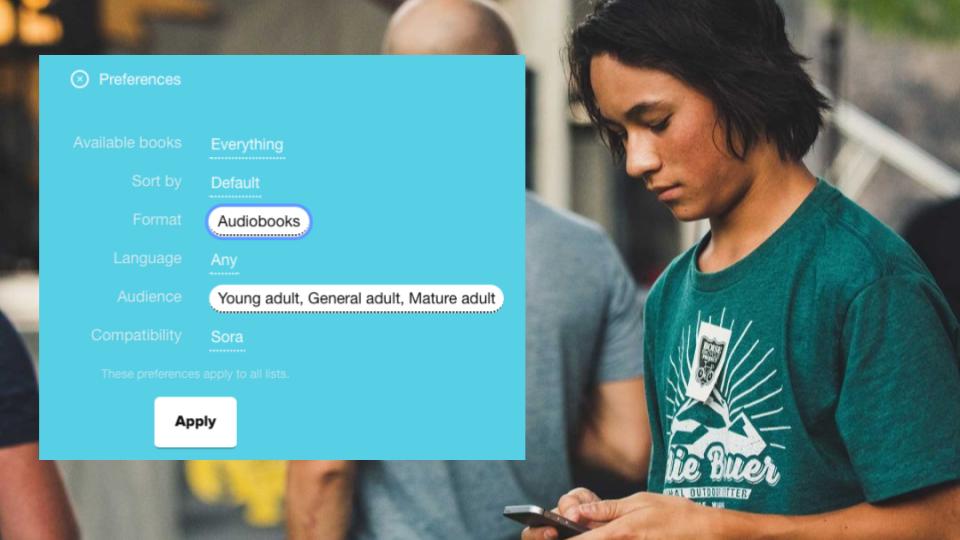
Have It Your WaySora's preferences menu lets you prioritize the books you want to see. Explore the whole collection, or filter suggestions by availability, popularity, age, format, and maturity level.
|

|
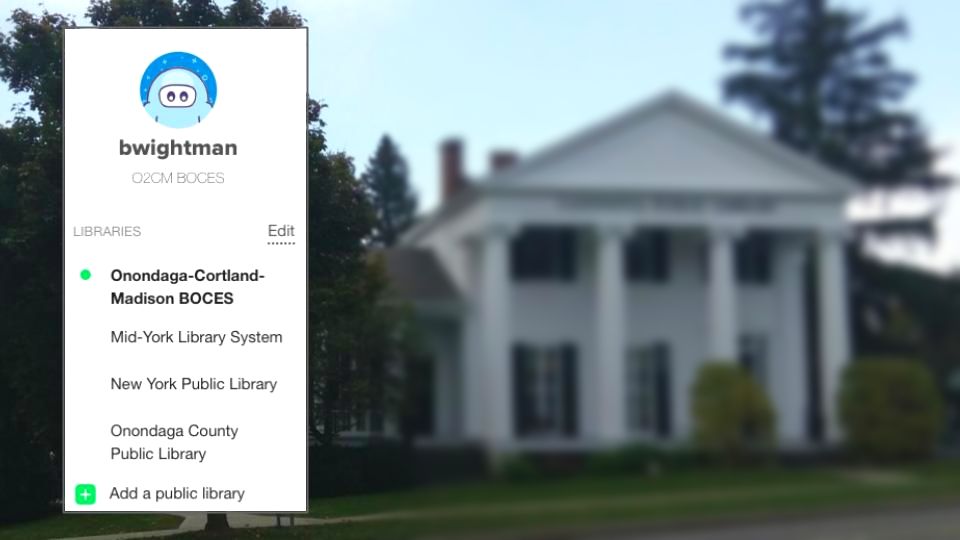
Add Public LibrariesSora makes it easy to borrow from both your school library and local public libraries. Just enter your library card number and PIN to link your accounts.
Don't have a public library card? Click here to learn how to get one online right now! |
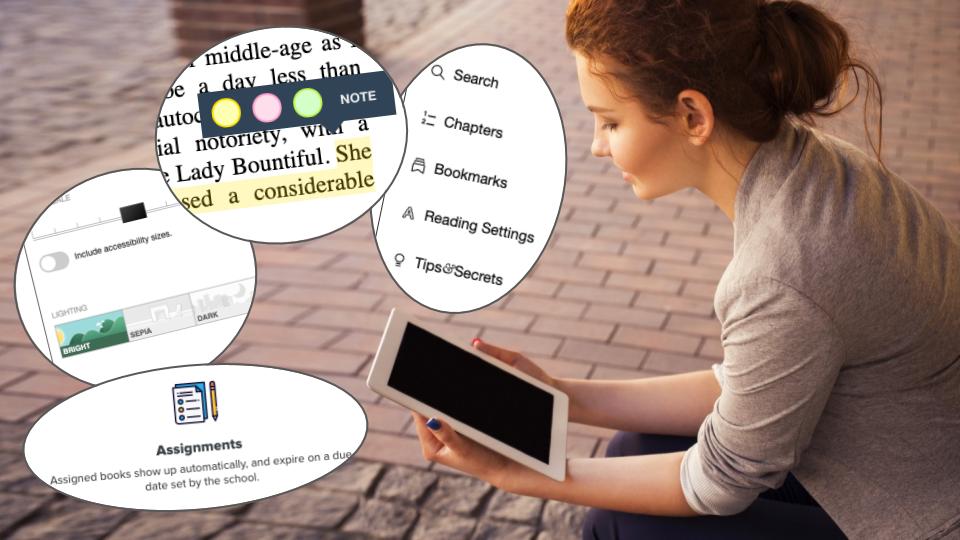
Tools and TricksWith Sora, you can add bookmarks, search the text, highlight, define words, set a sleep timer, and take notes - all without leaving the app.
Customize everything from the color of your screen, to the size of your font, to the speed of your audiobooks. |
|
Introductory Videos
|
|
|
Frequently Asked Questions
I don't know my password. What should I do?
If you're a student your password is your regular school password. If it does not seem to be working, check your username. It should be your school username, without the @caz.cnyric.org. If it still isn't working, email me. I update everybody's Sora account at the beginning of the year. If there's a problem, it may be my fault.
If you're a staff member you have a generic password. For obvious reasons, I didn't want to handle a spreadsheet of all the teachers' passwords. Email me if you've forgotten the password.
Other libraries advertise ebooks from Overdrive and Libby. How is Sora different?
Libby looks and functions similarly to Sora. The main difference is that Libby was designed for public libraries, while Sora was designed for school libraries. In my opinion, Sora is the better app, because it gives you the best of both worlds. You can add public libraries to your Sora account, but you can't add school libraries to your Libby account.
Overdrive is the parent company of both Libby and Sora. We used to advertise an Overdrive app, but the company has stopped updating it in order to focus on Libby and Sora. If you liked the Overdrive app it does still work. You can sign into it with your school username and password, just like Sora.
Why do I have to wait for the book I want?
Most Sora books are like regular library books. Only one person can use them at a time. Other readers have to wait for the first person to finish.
Why did my book disappear?
Sora books have a two-week lending period. When the two weeks are up, the book disappears from your account.
What if I need more than two weeks to finish my book?
If no one else is waiting for your book, you can easily renew it. Just tap "Shelf," -->"Options," --> "Renew."
The options menu also includes a return button. If you finish a book early, you can return it to help out the next person waiting.
How do I connect a public library account?
After you log in, tap the 3 bars in the top right corner of the screen, then click "Add a public library." Sora allows you to add library systems from all over the country, but you will need a library card to borrow materials. The Cazenovia Public Library is part of the Mid York Library System.
If you're a student your password is your regular school password. If it does not seem to be working, check your username. It should be your school username, without the @caz.cnyric.org. If it still isn't working, email me. I update everybody's Sora account at the beginning of the year. If there's a problem, it may be my fault.
If you're a staff member you have a generic password. For obvious reasons, I didn't want to handle a spreadsheet of all the teachers' passwords. Email me if you've forgotten the password.
Other libraries advertise ebooks from Overdrive and Libby. How is Sora different?
Libby looks and functions similarly to Sora. The main difference is that Libby was designed for public libraries, while Sora was designed for school libraries. In my opinion, Sora is the better app, because it gives you the best of both worlds. You can add public libraries to your Sora account, but you can't add school libraries to your Libby account.
Overdrive is the parent company of both Libby and Sora. We used to advertise an Overdrive app, but the company has stopped updating it in order to focus on Libby and Sora. If you liked the Overdrive app it does still work. You can sign into it with your school username and password, just like Sora.
Why do I have to wait for the book I want?
Most Sora books are like regular library books. Only one person can use them at a time. Other readers have to wait for the first person to finish.
Why did my book disappear?
Sora books have a two-week lending period. When the two weeks are up, the book disappears from your account.
What if I need more than two weeks to finish my book?
If no one else is waiting for your book, you can easily renew it. Just tap "Shelf," -->"Options," --> "Renew."
The options menu also includes a return button. If you finish a book early, you can return it to help out the next person waiting.
How do I connect a public library account?
After you log in, tap the 3 bars in the top right corner of the screen, then click "Add a public library." Sora allows you to add library systems from all over the country, but you will need a library card to borrow materials. The Cazenovia Public Library is part of the Mid York Library System.
|
I tried to borrow a public library book and Sora asked for my card number and PIN. Where do I find those?
If you have a Mid York library card, your card number is the 13-digit number on the front of your library card. The default PIN is the last four digits of the phone number you gave the library when you signed up for the card. If you need to reset your PIN, you can do it on the Mid York Library website. Just click "log in" then "forgot my PIN." |
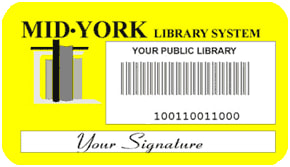
Sample Mid York Library Card
|
What can I do if I don't have a public library card?
Most public library systems have made it easy to sign up for a digital library card. If you are a Madison County resident, you can sign up for a Mid York Library card here. If you are an Onondaga County resident, you can sign up for an Onondaga County Public Library card here. All New York State residents are also eligible to apply for a New York Public Library card.
I highlighted a passage and wrote a note for myself. Where did those go?
Your highlights and notes are stored under "Shelf" --> "Options" --> "Notes and Highlights." From that screen, there is a button in the upper right corner that you can use to export them to places like Google drive.
Are all these books really free?
They are, and will always be free for you.
Behind the scenes, ebook lending is a complicated thing. Some publishers resent digital library services, because they view borrowed ebooks as lost sales. In reality, libraries help publishers engage readers they might not otherwise reach. I'm sure most of you would try out far fewer new books if you had to pay full price for each one. On the flip side, perhaps some of you have bought a favorite author's books after discovering him or her at the library. I know I have.
Most people do not realize how difficult it is becoming for libraries to maintain large collections of popular ebooks. Publishers often charge libraries two or three times as much as regular customers for ebooks. Furthermore, some of the biggest publishers have decided that libraries can only buy ebooks that expire after one year. They say this is to simulate the way physical books wear out as people borrow them. However the expiration date stays the same even if just one or two people borrow the book. Some ebook and audiobook publishers, most notably Amazon, refuse to sell to libraries at all. That's why you will never find an Audible-exclusive audiobook in Sora.
If you want to help keep ebooks and audiobooks accessible to all, make your voice heard. In March 2020, following an intense campaign of public pressure, Macmillan abandoned a controversial policy of restricting library systems to a single copy of new ebooks during their first two months of publication. In January 2020, our state senator, Rachel May, introduced a bill to require publishers to offer libraries fair access to ebooks they sell on the retail market.
You can sign a petition to let Senator May and Assemblyman Salka know you support this effort to ensure libraries can continue to offer a strong collection of ebooks and audiobooks.
If I don't see the book I want in Sora, can you order it for me?
Maybe. The district does budget money for ordering new books in Sora. However, not all books are a good fit for the collection. If you are the only person who wants a book that will expire after one year, it may make more sense for you to buy the book yourself, at a fraction of the price the library would pay.
With that being said, it never hurts to ask. Email me if you would like to see a particular book added to Sora. I can research what it would take to acquire it.
I heard teachers can assign books in Sora, and track their students' progress. How does that work?
Sora advertises a number of teaching tools, including the ability to assign books to specific students, and the ability to track students' progress. Unfortunately, our use of these tools is complicated by the fact that we connect with Overdrive through BOCES. In the short term, we are unlikely to reach a point where you will be able to push books to students through your Sora account. I have a limited ability to assign books through the admin account, but only for a small number of titles. These features may be further developed in the future.
What's your opinion on Sora?
I'm a big fan. I like all the tools, and the easy-to-use interface. I don't borrow a ton of ebooks, because I spend a lot of time working on computers and I like to mix it up in my free time. However, I listen to a lot of audiobooks in the summer. I like to go through them while I'm traveling or riding my bike. It gives my mind something to do at times that would otherwise be monotonous.
Aren't those achievement badges a little childish?
I mean, they do look a little juvenile and high school students probably won't care about them that much. On the other hand, I've earned 10 of them and it's freakin awesome! None of you can convince me otherwise. Nerds rule!
Most public library systems have made it easy to sign up for a digital library card. If you are a Madison County resident, you can sign up for a Mid York Library card here. If you are an Onondaga County resident, you can sign up for an Onondaga County Public Library card here. All New York State residents are also eligible to apply for a New York Public Library card.
I highlighted a passage and wrote a note for myself. Where did those go?
Your highlights and notes are stored under "Shelf" --> "Options" --> "Notes and Highlights." From that screen, there is a button in the upper right corner that you can use to export them to places like Google drive.
Are all these books really free?
They are, and will always be free for you.
Behind the scenes, ebook lending is a complicated thing. Some publishers resent digital library services, because they view borrowed ebooks as lost sales. In reality, libraries help publishers engage readers they might not otherwise reach. I'm sure most of you would try out far fewer new books if you had to pay full price for each one. On the flip side, perhaps some of you have bought a favorite author's books after discovering him or her at the library. I know I have.
Most people do not realize how difficult it is becoming for libraries to maintain large collections of popular ebooks. Publishers often charge libraries two or three times as much as regular customers for ebooks. Furthermore, some of the biggest publishers have decided that libraries can only buy ebooks that expire after one year. They say this is to simulate the way physical books wear out as people borrow them. However the expiration date stays the same even if just one or two people borrow the book. Some ebook and audiobook publishers, most notably Amazon, refuse to sell to libraries at all. That's why you will never find an Audible-exclusive audiobook in Sora.
If you want to help keep ebooks and audiobooks accessible to all, make your voice heard. In March 2020, following an intense campaign of public pressure, Macmillan abandoned a controversial policy of restricting library systems to a single copy of new ebooks during their first two months of publication. In January 2020, our state senator, Rachel May, introduced a bill to require publishers to offer libraries fair access to ebooks they sell on the retail market.
You can sign a petition to let Senator May and Assemblyman Salka know you support this effort to ensure libraries can continue to offer a strong collection of ebooks and audiobooks.
If I don't see the book I want in Sora, can you order it for me?
Maybe. The district does budget money for ordering new books in Sora. However, not all books are a good fit for the collection. If you are the only person who wants a book that will expire after one year, it may make more sense for you to buy the book yourself, at a fraction of the price the library would pay.
With that being said, it never hurts to ask. Email me if you would like to see a particular book added to Sora. I can research what it would take to acquire it.
I heard teachers can assign books in Sora, and track their students' progress. How does that work?
Sora advertises a number of teaching tools, including the ability to assign books to specific students, and the ability to track students' progress. Unfortunately, our use of these tools is complicated by the fact that we connect with Overdrive through BOCES. In the short term, we are unlikely to reach a point where you will be able to push books to students through your Sora account. I have a limited ability to assign books through the admin account, but only for a small number of titles. These features may be further developed in the future.
What's your opinion on Sora?
I'm a big fan. I like all the tools, and the easy-to-use interface. I don't borrow a ton of ebooks, because I spend a lot of time working on computers and I like to mix it up in my free time. However, I listen to a lot of audiobooks in the summer. I like to go through them while I'm traveling or riding my bike. It gives my mind something to do at times that would otherwise be monotonous.
Aren't those achievement badges a little childish?
I mean, they do look a little juvenile and high school students probably won't care about them that much. On the other hand, I've earned 10 of them and it's freakin awesome! None of you can convince me otherwise. Nerds rule!